How to Use AI at a Startup (A Guide for Employees, Not Founders)
Apr 13, 2026Most people are using AI wrong
Not in an obviously broken way. The output looks fine. The summaries are passable. The drafts save time. It feels like productivity.
It isn't.
What it actually is: you've taken the part you were already doing (typing, drafting, summarising) and made it faster. The part you weren't doing (thinking deeply about what you're trying to achieve, building real context, pushing back on your own work) you're still not doing. You've just compressed the mediocre version of your job into less time.
That's not an AI revolution. It's a calculator with a personality.
Meanwhile, the person two desks over is using the exact same Claude subscription and pulling ahead. They're getting the interesting projects. They're becoming the person leadership asks first. Same tool. Completely different game.
Twenty years in startups across design, product, and leadership, and this is the biggest gap I've watched open up between people. It's only getting wider.
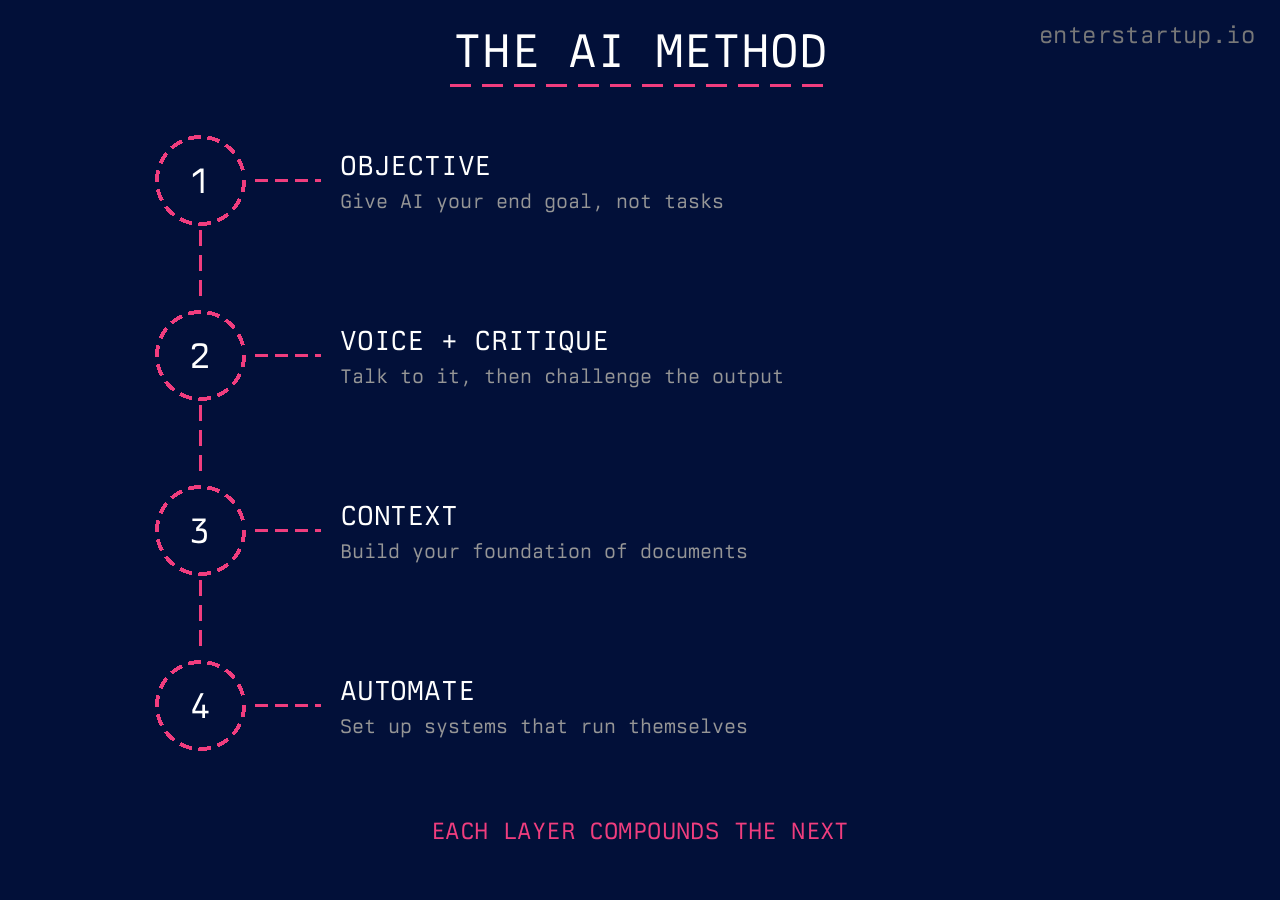
This isn't a list of 47 tools you should sign up for. It's a method. Three foundational layers, then one more that changes the game:
-
Start with the objective. Don't give AI tasks. Give it your end goal and get it to ask you questions before it does anything.
-
Use voice and critique. Two tactical habits that change the quality of everything AI produces for you.
-
Build your contextual foundation. Feed AI the documents, research, and background it needs so that every conversation starts smarter than the last.
-
Then automate. Once the first three are running, you stop typing prompts one by one and start setting up systems that run themselves.
Most people only ever do a version of layer one. And badly. Here's how each one actually works.
How Should Startup Employees Think About AI?
The short answer: stop thinking about AI as a task machine and start thinking about it as a thinking partner. The unlock isn't better prompts. It's starting at the objective level: tell the AI what you're actually trying to achieve, then let it help you figure out the best approach before it produces a single word.
Almost nobody does this.
They jump straight to "write me a thing." The AI writes them a thing. And the thing is mediocre, because the AI had no idea what good looks like for their specific situation.
Here's the mental shift that changes everything: start with the objective, not the task.
Instead of "write me a competitive analysis," try this: "I'm trying to figure out whether we should enter the UK market in Q3. Our product does X, our team is Y people, and our biggest constraint is Z. What's the best way to evaluate this decision? Before you start, ask me what else you'd need to know."
That last line is the key. "Ask me what else you'd need to know."
When you do this, the AI starts asking you questions you hadn't thought of. Market size. Regulatory differences. Whether your pricing works in GBP. Customer support hours. And as you answer those questions, two things happen. First, the AI gets smarter about your actual situation. Second, you get smarter about your actual situation. The process of answering forces you to think it through.
This is the difference. The model isn't the variable. What you've told it is.
Anthropic's own prompting guide has a line that nails it: treat AI like a brilliant but new employee. Capable of exceptional work, but with zero context on your company, your stakeholders, or what "good" looks like in your world. OpenAI's best practices land in the same place. Be clear. Be specific. Provide context. You wouldn't throw a brief at a new hire and say "figure it out." Don't do it with AI either.
This matters more in a startup than anywhere else. In a 12 person team, every single person's output is visible. There's no strategy team absorbing your bad decisions. No research department double checking your thinking. No middle management layer to clean up your sloppy work before it reaches the CEO. You've got your own judgment, your team, and now a thinking partner that's available at 2am when you're prepping for a board meeting.
Use it like one.
What Are the Two Tactical Unlocks That Actually Matter?
The short answer: voice input and self-critique loops. Voice lets you express what you actually mean without the friction of typing. Critique loops prevent you from shipping mediocre AI output as finished work.
Forget prompt libraries. Forget "50 ChatGPT prompts for productivity." (Those articles are written by people who've never shipped anything under pressure.) You need two habits.
Talk to It
Voice to text is a massive unlock that most people underestimate.
Here's why. When you type a prompt, you tend to write like you're filling out a form. Short. Clipped. Missing context. A Harvard Business School study with BCG consultants found that people using AI with rich context produced work that was 40% higher quality than people using the same AI without it. When you talk, you ramble. And that ramble contains exactly the context the AI needs.
You'll say things like "well, the thing is, our CEO really cares about this because last quarter we lost a deal over it, and the sales team has been asking for something like this for months, and honestly I think the real problem is that our onboarding flow is broken but nobody wants to admit it."
That's gold. The AI now understands the political context, the urgency, the stakeholder dynamics, and the real problem underneath the surface problem. You'd never type all that. But you'll say it in thirty seconds.
Most modern AI tools support voice input natively. Claude has a full voice mode where you can speak naturally and it processes your request without losing context between voice and text turns. ChatGPT has similar capabilities. Use them. Especially for the first message in a conversation where you're setting the scene. Talk like you're explaining the situation to a colleague who just sat down next to you. Don't edit yourself. Let it flow.
Critique Everything
The second habit: never accept what AI gives you on the first pass.
I don't mean proofread it. I mean have the AI critique its own work. After it produces something, say: "Now critique this. What's weak? What's missing? What would a smart, skeptical reader push back on?"
Watch what happens. It'll find problems you didn't see. It'll flag assumptions. It'll point out where the logic is thin. Then you fix those things and you've got something significantly better than the first draft.
This isn't some hack you found on Twitter. Anthropic's own docs recommend "asking Claude to self-check" before you accept any output. OpenAI calls it "iterative refinement" and considers it a core best practice. The tools are designed for this loop. Generate, critique, refine. Most people skip straight from generate to ship. That's how you end up producing what HBR calls "workslop": AI generated content that looks polished but costs your team hours of rework when they actually try to use it.
This is the difference between using AI as a shortcut and using it as something that actually makes your work better. The first gives you speed. The second gives you quality. At a startup, you need both.
The people I've watched thrive with AI all do some version of this loop: context in, draft out, critique, refine. It takes maybe ten extra minutes and the output is completely different.
What's the Contextual Foundation and Why Does It Matter?
The short answer: it's the background material, documents, and research you build up over time so that every AI conversation starts from a position of depth instead of zero. This is what separates a one-off AI interaction from a compounding advantage.
Here's what this looks like in practice.
Say you're doing marketing for a startup. Before you ask AI to help you write a landing page, you give it your contextual foundation. Your brand guidelines. Your customer personas. A document on psychological triggers relevant to your audience. The last three customer interviews. Your competitor's pricing page.
Now when you say "help me write a landing page that converts," the AI isn't guessing. It's working from the same base of knowledge you are. The output goes from generic to specific in one step.
You can build this foundation as you go. Every time you do research, save it. Every time you create a document that captures how your company thinks about something, add it to the pile. Customer feedback summaries. Product strategy docs. Sales call transcripts. The more context AI has access to, the less time you spend re-explaining your world.
The tools make this easier than you'd think. Anthropic's Claude lets you set up projects with persistent context, so every conversation starts with your foundation already loaded. Drag in the raw files. Don't summarise first. Let the AI read the source material in full. Summaries strip out the nuance that makes AI output specific. Their long context tips show how to structure documents so the AI gets the most out of them.
OpenAI has a similar concept they call retrieval-augmented generation: feed the model your own data alongside your questions. Both platforms are pushing in the same direction. The AI gets dramatically better when it's working from your actual materials, not its general training data.
Anthropic published an engineering guide on what they call "effective context engineering". The core idea: the quality of AI output is a direct function of the context you give it. Not the prompt. The context.
And you can build context you don't have yet. Unsure which psychological triggers work best for SaaS conversion? Ask the AI to research it, pull together findings, and save that as a reference document. Next week when you're writing landing page copy, that research is already loaded. You're not starting from scratch. You're starting from a position of depth.
The foundation compounds. A month in, your AI conversations start from a completely different place than they did on day one. That's the real advantage. Not speed. Accumulated intelligence.
And here's what people miss about the three layers above: the setup isn't there to slow you down. It's there so the AI can actually execute properly when you finally let it loose. Once you've given it the objective, refined the output through critique, and loaded it with context, the AI doesn't just help you think. It does the work. Briefs, competitive analyses, email sequences, board deck outlines, all produced at a quality you can ship because the thinking already happened. Ten minutes of setup, then the machine runs.
What Comes After You've Mastered the Three Layers?
The short answer: automation. Once you've got the objective-first habit, the voice and critique loops, and a contextual foundation that actually contains your world, you stop running every AI conversation by hand and start building systems that run themselves.
The shift here is moving past one-off conversations and into systems that run on a schedule, in the background, handing you the output without you opening a chat window.
Most people aren't anywhere near this yet. They're still typing one-off prompts. What's emerging right now is agentic systems that take entire chunks of your job and run them while you sleep.
A concrete example. Anthropic's Claude Cowork is built for this. The piece that matters is scheduled tasks. You describe a task once, pick a cadence (daily, weekly, hourly, on demand), and it runs. Every morning. While you're making coffee.
You're not just using AI to think. You're delegating pieces of your job to a system that runs without you. No code. Clear instructions and a schedule. (More on what those tasks actually look like in the next section.)
This is the multiplier. One person with six scheduled tasks running in the background is operating at a different level than one person grinding out individual prompts all day. Same eight hours. Completely different surface area.
You can't start here though. If you automate before you understand objective-first thinking, voice, critique, and context, you just scale mediocre output. That's worse than not automating. But once the basics are in, the ceiling goes up sharply.
What Does Using AI at a Startup Actually Look Like?
The short answer: integrating it into the decisions, the communication, and the actual output that eat up your day. The thinking partner part is half of it. The other half is what actually gets shipped once the thinking is done.
Here are the five patterns I keep seeing work:
-
Prepping for hard conversations. You need to talk to your manager about a project that's off track. Instead of walking in cold, you talk through the situation with AI. "Here's what happened. Here's what I think went wrong. Help me figure out how to frame this so it's constructive and not defensive." It'll help you find the right framing. (I wrote a whole post on this: How to Manage Up as a Startup Employee.)
-
Making decisions with incomplete data. Welcome to every week of your life. You've got 60% of the information you need and a decision that can't wait. Give AI the full picture of what you know, what you don't know, and what the stakes are. Ask it to help you think through the options. It won't make the decision for you. But it'll help you see angles you missed.
-
Drafting anything that needs to be clear. Product briefs, internal memos, customer emails, board updates. Not because you can't write, but because the first draft from your brain mixed with AI's structure tends to be better than either one alone. Start with voice, refine with critique.
-
Research that would normally take hours. Competitive analysis, market sizing, technical feasibility. AI won't replace proper research. But it'll get you to 80% in twenty minutes so you can spend your time on the 20% that requires actual human judgment.
-
Running things in the background while you work. Set up a scheduled task to scan your product analytics each morning and surface the three numbers that moved. Another to pull yesterday's support tickets into a Slack summary before standup. Another to flag competitor activity weekly. You're not opening a chat for these. They run on their own and the output is waiting when you need it. This is where AI stops feeling like a tool and starts feeling like a team.
The common thread: you're not outsourcing your thinking. You're compressing the whole cycle. From "I have a vague idea" to "I have a clear plan" to "it's done and it's good." Then the routine pieces of the cycle start running themselves. That compression is everything when you have less time and fewer people than everyone you're competing against.
How Do You Avoid the AI Trap?
The short answer: don't use AI to produce more. Use it to produce better. Speed without quality is just faster failure. AI makes you efficient at being wrong if you don't know what good looks like.
I wrote about this pattern in The AI Washing Era. Companies are laying people off and replacing them with AI generated output that looks professional but says nothing. The same thing happens at the individual level.
If you're cranking out five product briefs instead of one good one, you're in the trap. If you're sending AI drafted emails without actually reading them, same thing. And if the AI is doing the thinking while you click "approve," you're already in deep.
Here's the test: could you explain, in your own words, why the AI's output is good? Not "it looks professional." Could you defend the specific choices it made? If not, you don't understand the output well enough to ship it.
McKinsey's research on AI adoption keeps finding that the biggest barrier to value isn't the technology. It's people and change management. The tech is the easy part. Using it well is the hard part.
Your reputation in a small team is built on the quality of your judgment, not your output volume. The person who ships three excellent things a week with AI assistance is more valuable than the person who ships fifteen mediocre things.
Don't use AI to generate more noise. Use it to think more clearly.
Where to Start
Your next AI conversation, try one thing. Don't give it a task. Tell it what you're trying to achieve, and finish with: "ask me what else you'd need to know." Do that once. See what happens. Then layer in voice and critique from there.
The tools will keep changing. The way you think with them is the part that compounds.
For the framework underneath all of this (Attitude, Relationships, Competence) check out the ARC Framework deep dive.
And if you're trying to figure out whether your startup is the right fit or you want to talk through how to accelerate your impact, I work with a small number of 1:1 coaching clients.
Get at it.
Sources & References
The research and best practices cited throughout this article draw from the following primary sources, listed in order of appearance:
-
Anthropic – "Claude Prompting Best Practices" — https://platform.claude.com/docs/en/build-with-claude/prompt-engineering/claude-prompting-best-practices
-
OpenAI – "Prompt Engineering Best Practices for ChatGPT" — https://help.openai.com/en/articles/10032626-prompt-engineering-best-practices-for-chatgpt
-
Harvard Business School – "Navigating the Jagged Technological Frontier" (Dell'Acqua, McFowland, Mollick, et al., 2023) — https://www.hbs.edu/faculty/Pages/item.aspx?num=64700
-
Anthropic – "Using Voice Mode in Claude" — https://support.claude.com/en/articles/11101966-using-voice-mode
-
Harvard Business Review – "AI-Generated 'Workslop' Is Destroying Productivity" (September 2025) — https://hbr.org/2025/09/ai-generated-workslop-is-destroying-productivity
-
Anthropic – "Long Context Prompting Tips" — https://docs.anthropic.com/en/docs/build-with-claude/prompt-engineering/long-context-tips
-
OpenAI – "Prompt Engineering: Retrieval-Augmented Generation" — https://developers.openai.com/api/docs/guides/prompt-engineering
-
Anthropic Engineering – "Effective Context Engineering for AI Agents" — https://www.anthropic.com/engineering/effective-context-engineering-for-ai-agents
-
Anthropic – "Get Started with Claude Cowork" — https://support.claude.com/en/articles/13345190-get-started-with-claude-cowork
-
Anthropic – "Schedule Recurring Tasks in Claude Cowork" — https://support.claude.com/en/articles/13854387-schedule-recurring-tasks-in-claude-cowork
-
McKinsey & Company – "The State of AI" (QuantumBlack, 2025) — https://www.mckinsey.com/capabilities/quantumblack/our-insights/the-state-of-ai