
Claude Cowork for non-techies: Part II: How to build the kitchen
May 03, 2026Part I named the kitchen. This is where you learn to cook. I'm going to walk you through how I actually build a Cowork skill, end to end. The questions I ask Claude. The layers I add. The bits I get wrong on the first try. The post you're reading was built this way. That's not a flex. It's the demo.
Quick refresher in case you missed Part I.
Cowork is the kitchen. A skill is a recipe (lives in a folder, plain English, no code). A task is a cooking session. A connector is your supplier. A plugin is a meal kit. The Out of Office Method is three steps in plain English: Why → One → Many. Pick the deep reason you want this in your life, build one good recipe that handles a specific job, then let that recipe run and scale until the kitchen runs whether or not you're at the stove.
If any of those words made no sense, Part I is here. Five minutes, then come back.
This post is the build. We're going to take Why → One → Many and apply it to actually constructing a skill. Soup to nuts. Voice-to-text included. AI talking back to me included. The bits I had to throw out and rebuild included.
By the end you'll know how to make your first one.
You teach it once.
Why is everything. Start here, every single time.
If you do nothing else from this post, do this.
Before you open a document, before you write a single instruction, before you even think about what tools you'll need, sit somewhere quiet and finish the sentence: what do I actually want to be different in my life because this skill exists?
That's the Why.
It's not "I want a skill that drafts blog posts." That's a deliverable. It's "I want to publish a blog post a week without losing my Sunday afternoon." That's a Why. The first one is a feature. The second one is a life change.
The Why is the test for everything that comes later. Every decision I make in the One (what to include, what to cut, what to add) gets measured against the Why. If a refinement doesn't move the skill closer to the Why, it doesn't go in. Without a sharp Why I'd build a skill that does seventeen things and serves none of them.
Two things I do that nobody told me to do but that change the result.
⌖ Dictate the Why, don't type it. I use the microphone button on my keyboard. Voice-to-text is faster than typing, and more importantly, it doesn't let me edit while I think. When I dictate "I want to launch the book next year without burning out my weekends," that's a different output than the polished version I'd type. The dictated one is honest. The typed one is a brochure.
⌖ Make Claude argue with the Why. Once I've stated it, I don't move on. I ask Claude to push back. "What's missing from this Why? What would a sceptical version of me say is wrong with it?" The robots are alarmingly good at this. They'll point out that "publish a blog a week" might not actually serve "grow the brand" if the posts are bad, or that "without burning out my weekends" doesn't account for the part where I love writing. I sit with those pushbacks. Half the time I revise the Why before I touch a recipe.
The Why takes about ten minutes if you do it properly. Most people skip it. That's why so many AI workflows fall apart at month two.
No good recipe ever started with "build the recipe." It started with what the dinner was for.
The One is most of the work. This is where you and the robot make the recipe together.
Now you've got your Why. You build the One.
The One is where the recipe gets made. It is, hand on heart, the most rewarding bit of using Cowork. You sit with Claude (using your voice, if you've got the microphone shortcut wired up) and you talk through, in plain English, what you want this skill to do.
The trick is: you're not writing a doc. You're having a conversation that will eventually become a doc. Big difference.
Before you start the build, do this one thing.
Open Cowork and start a project. A project is a workspace that hangs onto context across conversations. Give it a description that captures your Why in one line. Mine, for the topic-research example, was "A weekend topic-research skill that helps me publish a post a week without losing Saturday morning." The description anchors every conversation that happens inside this project. Skip this and Claude has to relearn the goal every time.
Now the build itself. Eight moves, in order.
-
Open the conversation with the brief. Inside the project, paste your Why. Then say what kind of skill you want to build. "Help me build a skill that handles weekend topic research. Ask me follow-up questions." Claude will start asking. Answer in plain English.
-
Pull in what you already have. Relevant things you've already got. For my trend-research skill, that meant: my existing blog index (so the skill knows what topics I've already covered), my book table of contents (so it knows my range), my notes on what kinds of search topics drive real traffic, past posts that performed well, past posts that flopped. I literally point Claude at the files. "Read these. Tell me what you'd build." Layer one of context goes in.
-
If you're not an expert in the domain, ask Claude to teach you (and save what it teaches you). This is the move that turns Cowork from a smart assistant into a research partner. I am NOT an SEO expert. So before I locked the trend-research skill in, I asked Claude to do deep research on what makes a blog topic actually rank in Google in 2026. What's the new AI-summary box at the top of search? How is search behaviour changing? What kinds of phrases drive real traffic to small sites? I had it write me a one-page brief. Then I added that brief into the project as a reference file. Now my skill is informed by actual best practice in the domain, not my guess at it. If you're not an expert in what you're building for, this step is mandatory. Don't pretend you know what you don't. Ask the robots to teach you, then bake that learning into the project.
-
Refine through iteration. Claude proposes an outline of how the skill would work. I push back. "That's too generic. The skill needs to weight topics that get real search traffic above clever angles, because I keep falling for the clever angles and they don't drive readers." Claude updates. I push back again. "Add a confidence rating per topic so I know how strong each suggestion is, because I'd rather get one strong recommendation than five weak ones." Layer two. Layer three. Layer six.
-
Tell Claude to question itself. This is the move I use more than any other. Once we have a draft of the skill structure, I ask: "What's missing? Where am I being lazy? What would a senior content strategist tell me is broken about this?" The robots are extraordinarily good at finding gaps in your thinking when you give them permission. Most people don't give them permission, so most skills are shallower than they could be.
-
Pull in failure modes. Things this skill must NOT do. Mine, for trend research: don't recommend topics I've already covered. Don't recommend topics where the top result on Google is a Reddit thread (the audience is already getting that answer for free). Don't recommend topics so broad I'd be competing against five years of Harvard Business Review. Layer of "no" goes in.
-
Pull in voice and format. What does the output look like? For trend research it's three topic ideas max. Each one comes back with: the search phrase, a monthly search volume estimate, a quick read of what's already showing up at the top of Google for that search, a confidence rating (High / Medium / Low), and a one-paragraph fit-for-the-blog note. Specific. Repeatable. Screenshot-able.
-
Test it on a real job. Then save it. I run the skill end-to-end on something I actually need. The first version of the trend-research skill recommended three topics, of which one was useful, one was decent, and one was the AI making things up. So I went back. I added a "verify with real search data" rule. I added a "check the actual top of Google for that phrase" rule. The next run was better. The run after that was good enough to ship. When the skill produces output you'd actually use, you bundle it. The folder, the SKILL.md file, the references, the examples. From now on, when I want topic research, I don't redo this conversation. I just run the skill.
That whole process took me two evenings spread across one weekend. Not a Sunday afternoon. Not coding. A careful conversation, made permanent.
You don't write skills. You teach them.
What a finished skill actually looks like
If you stack everything we just walked through, a finished skill is a labeled box with seven blocks inside it. Each block is something you taught the robot once and never have to teach it again.
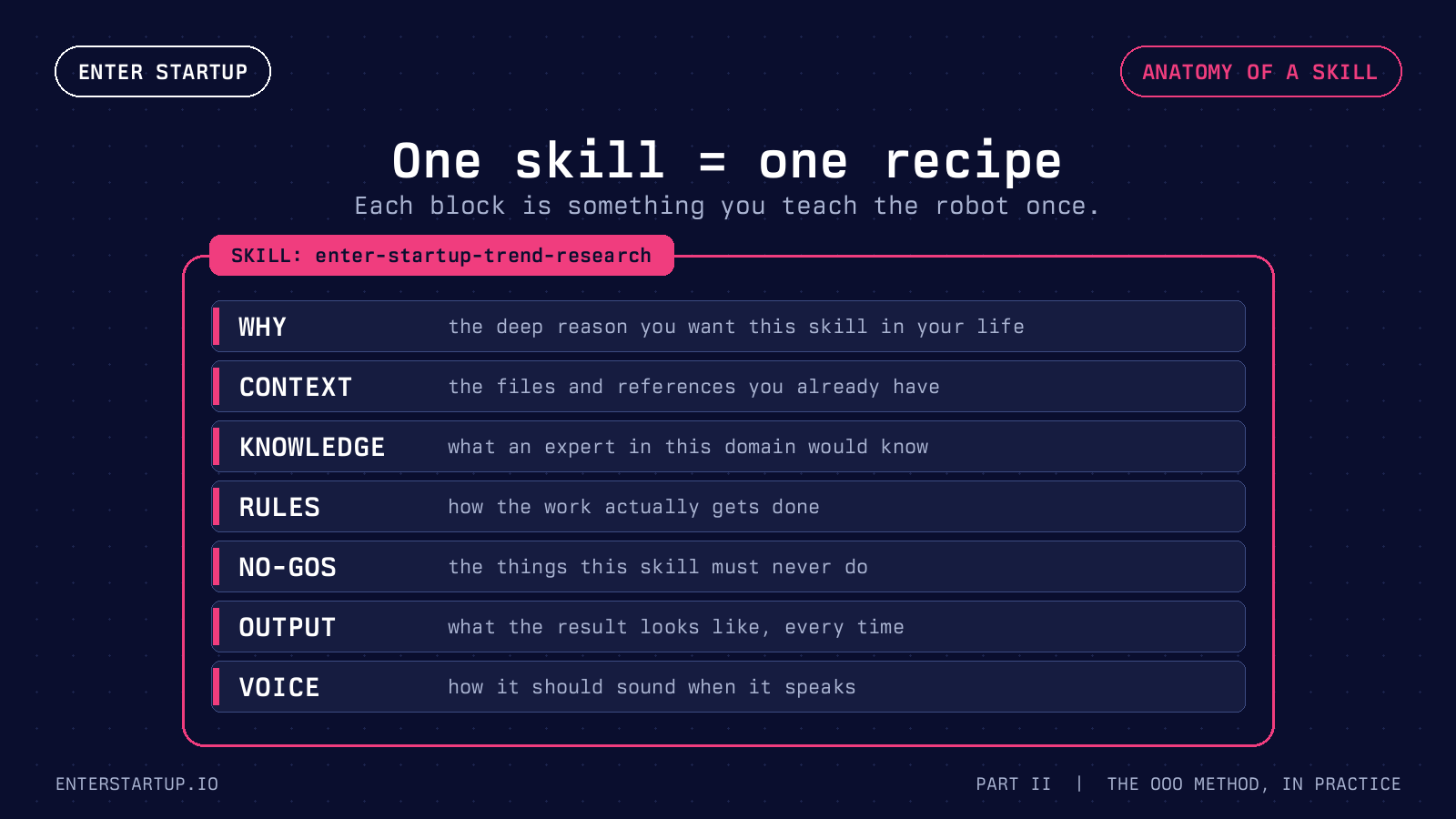
That whole thing is now a folder on my computer with a SKILL.md file at the top. I never rewrite any of that. I just point Claude at the folder and say "find me my next topic."
Build it once. Run it forever.
The skill you're inside right now
OK, the meta bit. I promised you this earlier.
The post you're reading was built by a skill called enter-startup-blog-publish. Same shape as the trend-research one, just bigger. Inside it:
⌖ A SKILL.md file describing the workflow end to end (research, draft, format for Kajabi, generate the thumbnail, push the draft).
⌖ A voice reference file with the phrases I never want it to use, the rhythm patterns I do, my spelling rules, and the kitchen-metaphor anchors.
⌖ A Kajabi style guide with the exact tags the editor accepts without breaking and the pull-quote pattern.
⌖ A blog SEO checklist for how to structure a post so the AI summary at the top of Google can pull from it.
⌖ A small Python script that generates the thumbnail with my brand template and the Berkeley Mono fonts.
⌖ Examples. The 90-days post. The Cowork Part I post. Annotated.
When I say "draft Part II of the Cowork series," Claude reads all of that, plus my book chapters and past posts, and produces a draft. I push back. I rewrite the bits that don't sound like me. I add the lived-experience anchors the robot can't fake. I publish.
The skill is the work I did once so I never have to redo it. The voice in this post is mine because the skill was taught my voice. The substance in this post is mine because I'm the one who's been doing this for twenty years and I'm the one telling Claude what to keep and what to cut.
That's the model. Skills don't replace voice. They preserve it.
Skills don't replace voice. They preserve it.
The Many is when the kitchen actually runs
The kitchen is built. The recipe is in the drawer. What can you do with it?
Four things, in order of how often most people use them.
⌖ Run it on demand. The default. You sit down to do the work, you say what you want, the skill runs. For trend research, that's me on Sunday morning, asking Claude for next week's topic. For blog drafting, that's me, an hour later, handing the topic back to Claude. Five minutes for one. Thirty for the other. The whole research-and-draft pipeline takes me under an hour now.
⌖ Schedule it. Some skills are repetitive enough that you don't even need to be in the room. I have a skill that pulls trending topics in startup-employee-land every Sunday at 9pm. By the time I open my laptop Monday morning, my topic shortlist is in my inbox. I didn't sit down to ask. The kitchen cooked while I was at dinner. That's automation. (Cowork has a mobile feature called Dispatch that lets you fire one-off tasks from your phone too. Same idea. Laptop running, you're not.)
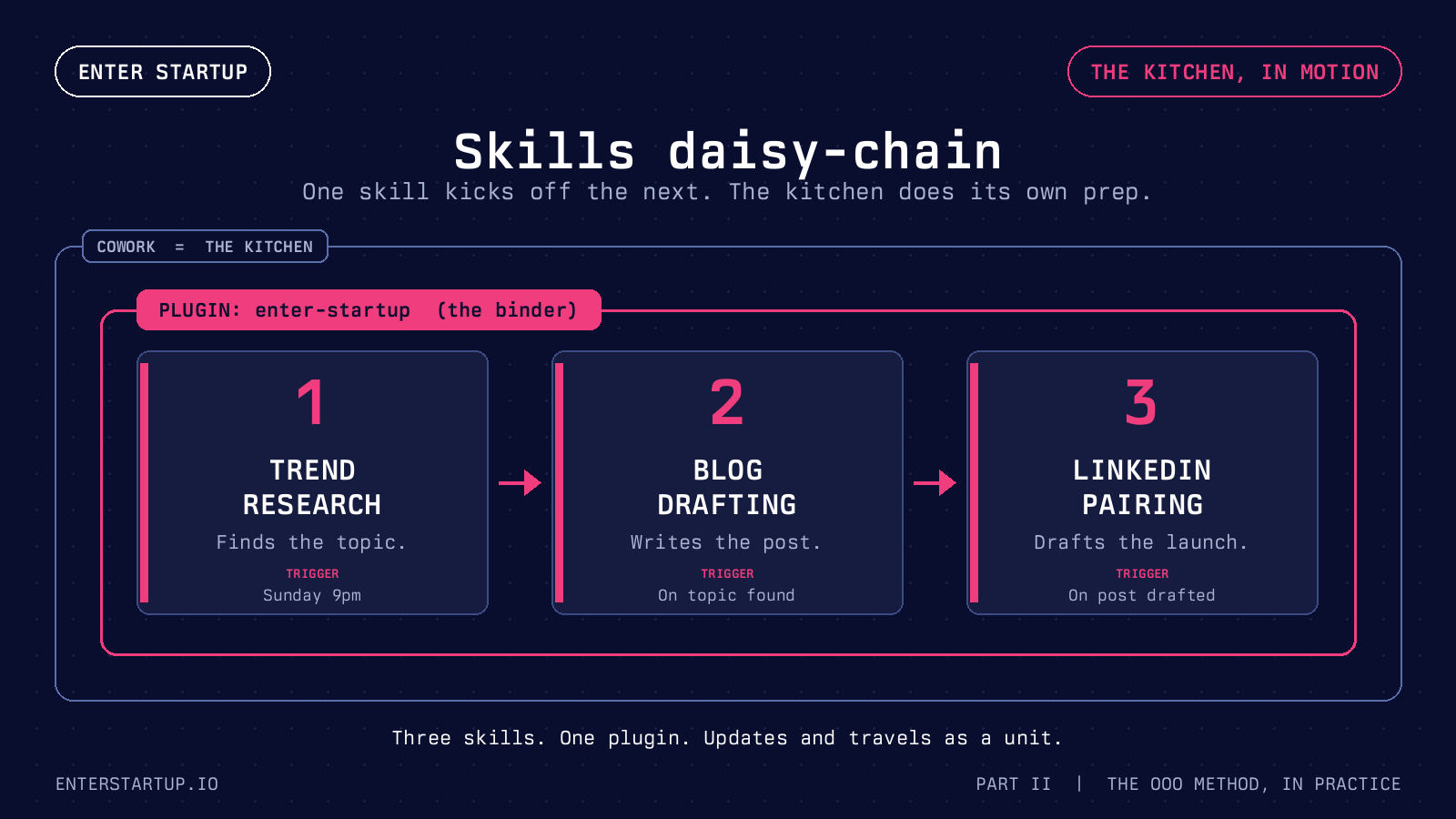
⌖ Daisy-chain them. This is the one that breaks brains. One skill can call another. When my topic-research skill produces a High-confidence topic, it kicks off my blog-drafting skill, which drafts the post, which kicks off my LinkedIn-pairing skill, which drafts the matching launch post. I sit down on Sunday morning and instead of starting from zero, I'm starting from a draft of a draft of a draft. I refine the human bits. I publish. The chain has done the heavy lifting.
⌖ Share them. A skill is just a folder. You can give that folder to a friend, a teammate, a community. Someone else's setup becomes yours, instantly. The whole plugin ecosystem is built on this. If someone has solved a recipe you don't want to solve, take theirs.
The Many is the bit where Cowork stops being a smart chat and starts being a production line. Same recipe, again and again, while the rest of your life happens.
You don't have to be at the laptop. That's the OOO bit.
Build the kitchen, then go.
What about plugins, then?
In Part I I called a plugin a meal kit. That's still right. A plugin is a packaged bundle of related skills, plus the suppliers they need, plus any helpers, all under one name. Think of it as the binder of recipes that travel and update together.
You don't need a plugin for a single skill. Loose recipe card on the kitchen bench works fine. You start needing one when you have three or four skills that work together.
The three skills above (trend research, blog drafting, LinkedIn pairing) all live in a plugin called enter-startup. They bundle into one binder I update together. When I refine my voice rules, all three skills pick up the change at once. When I'm ready to hand the whole setup to a coaching client or a reader, the plugin is the unit I hand over. One file. Three recipes. All wired up.
In short: a single skill is a recipe. A plugin is the binder of related recipes that travel together.
Skill = recipe. Plugin = binder of recipes.
The honest bit. Skills are never finished, and Cowork doesn't do everything.
I don't want to leave you with the impression that you build a skill once and it's perfect forever. Mine aren't.
The blog-drafting skill went through six versions before it produced something I'd ship. The first version sounded like LinkedIn-coach-AI-bot. The second was better but kept reaching for "unpack" and "let me tell you a story." Versions three through five fixed specific failure modes I kept seeing. Version six is the one writing this post, and it'll get to seven the first time it does something I notice and didn't like.
That's the loop. Build, ship, find the rough edges, refine, ship again. The skill is never finished. It just gets less wrong over time. The good news is each pass takes less effort than the one before, because the recipe is already on paper. You're not rebuilding from scratch. You're correcting one thing.
A few honest things Cowork doesn't do well yet (research preview, this'll all change).
⌖ Long jobs lose the plot. When a task runs for hours or pulls in huge documents, Cowork sometimes forgets what it was working on midway through. The fix is to break the job into smaller skills, each with its own focus. Don't ask one skill to do too much.
⌖ Voice precision on a brand new project. If you've never given Claude any voice references, the first draft will sound generic. The fix is the voice layer. Pin samples. Pin your no-go phrases. The robots can't read your mind on tone. Tell them what tone is.
⌖ Anything visual. Cowork is excellent with text and structured outputs. It's improving fast on images and design briefs but it isn't your designer yet. For me, the thumbnail still requires a human eye after the script generates it.
⌖ Working without your judgement. This isn't really a Cowork limit, it's a method limit. The skill produces a draft. You ship the final. If you stop reviewing, the rough edges sneak through, and after a few weeks of unattended output your audience will notice. The kitchen runs. The chef still tastes the food.
That last one is the most important. Skills are leverage. Leverage works in both directions. Build something that produces fast and you produce more, faster. Stop reviewing, and you produce more rubbish, faster. The OOO Method assumes a person at the door of the kitchen, occasionally tasting.
The kitchen runs. The chef still tastes the food.
So how do you actually start
Part I's homework was one sentence. Part II's homework is one weekend.
Pick the smallest, most repetitive thing in your life that costs you Sunday morning. Topic research, weekly meeting prep, recurring email drafts, podcast outline, content calendar, whatever. The thing you do every week that you secretly resent.
Open Cowork. Start a conversation. State your Why for that one thing. Let Claude push back. Refine the Why.
Then build the One. Pull your context. Layer it in. Push back. Refine. Test. Refine again. Save it.
That's your first recipe. By next Sunday morning you'll have a skill that does in five minutes what currently takes you ninety. From there you scale. Schedule it. Chain it. Share it.
That's the OOO Method, applied. Build the kitchen, then go.
You teach it once.
If you've made it this far, you understand the OOO Method better than most people who'll touch Cowork in the next year. Most of them will treat it as a smarter chatbot. You now know it's a kitchen.
Start with one Why. Build one good One. Get it to the point where it produces something you'd actually use. Schedule it, chain it, share it.
Real life is what's at stake. Sundays. Mondays that don't ruin Sundays. Side projects that don't eat weekends. Hours back. The upfront effort is finite. The payoff isn't.
If you want a hand getting your own first skill off the ground, I work with people through 1:1 coaching. We'll find your Why, build your first One, and you'll leave with something running. If you want a worked example of how I think about systems and frameworks more generally (different topic, same logic), the ARC framework for startup employees post is over here. And if you're new to all of this, the free Enter Startup course is the rest of the picture.
You just talk to it. Then you teach it. Then you go.