Claude Cowork for Non-devs: Part I: The OOO Method
Apr 26, 2026I'm not a developer. I've spent close to 20 years in and around startups, mostly on the product and growth side. I'm what you'd call a creative technologist. I love technology because of what it lets people do. Cowork is the first piece of software in a long time that has actually changed how I operate. Spoiler: you just talk to it!
I want to do something useful for you in this post.
I'm going to break down what Claude Cowork actually is, in plain English, for the people who keep hearing about it and wonder if it matters for them. No jargon. No nerdy support docs. No 1,000 YouTube videos. Just one creative-but-non-technical guy who fell in love with this thing, telling you what it is and why it matters.
A quick note on me. I love humans. I've spent a long time in sales, which is just helping people figure out what they actually want. I have a lot of natural empathy. I really do want to help. We're not on this earth that long. It's nice to get to help each other through the ups and downs.
AI is a different ballpark now. It moves fast, it's confusing, and most people don't have the time or the inkling to keep up. Maybe you're worried it's going to take your job. Maybe you've tried ChatGPT a couple of times and didn't see what the fuss was about. Maybe you've been told to "embrace AI" by a boss who doesn't know what that means either.
You don't have to worry. You can get ahead of this without becoming an engineer. Yes, you have to learn something new. But it isn't actually that hard.
You just have to start.
A small note before we go further
Most of this post was dictated. I used the microphone button on my keyboard. Then I worked with Claude to clean it up. That's how this works. You just talk to it. I'm proving the point as I go.
That's the on-ramp. Not coding. Not prompting. Not data science. Talking. If you can describe what you want to a friend, you can use Claude Cowork. The rest of this post is just naming the parts so the talking goes further.
You just talk to it.
The first time I noticed something different
A bit of recent history. I'd been using Claude for a while. Mostly conversations. I'd tell it what I wanted, give it the context, work through the thinking, get something useful out the other side. Good. Helpful. But every conversation started from scratch. Every time I came back, I was re-giving the same context to the same dog walker about the same dog.
Then Anthropic added Projects. I could attach documents to a workspace. Now Claude knew the context across conversations. Less re-giving. Big upgrade.
Then they brought out Tasks. And that's when it actually clicked.
I realised I could take a long, careful conversation, the kind where I'd worked out exactly how I wanted something done, with all my preferences and context and the way I want the output to look, and I could package it. Bundle the whole thing into a task. The next time I needed it, I didn't have to redo the conversation. It just ran. The same way. Every time.
That was the moment. Cowork stopped being a chatbot. It became a system. A repeatable, packageable, runnable system that could keep doing the careful thing I'd taught it to do, while I went and did something else.
Look, if you take one thing from Part 1, take this. You can teach this thing how you want something done, and then never have to teach it again. That's the whole game.
I call it the Out of Office Method
The whole reason this matters is the payoff state.
Get the system right and you can actually be Out of Office, and the work doesn't stop. You can be at the school pickup, on the weekend, on a flight, having dinner. The kitchen keeps running. The meal still gets served.
So that's the name. The Out of Office Method. Three steps. Three plain-English words.
Why. One. Many.
⌖ Why is the deep reason. The thing you actually want different in your life. Not a project goal. Not a deliverable. The level above all that. I want to live well. I want my Mondays back. I want to launch the book without burning out my weekends.
⌖ One is the working unit. The recipe. You sit with Claude, you talk through what you want, you refine it until it's right, and you bundle the whole thing into a task or a skill. Now you have one good meal you can make any time, the same way, without thinking about it.
⌖ Many is the scale. Same one good meal, again and again. Across time. Across people. Across contexts. Run it every Sunday. Share it with your partner. Give it to your team. Eventually it runs while you're not in the room.
That's the Out of Office Method. Why. One. Many.
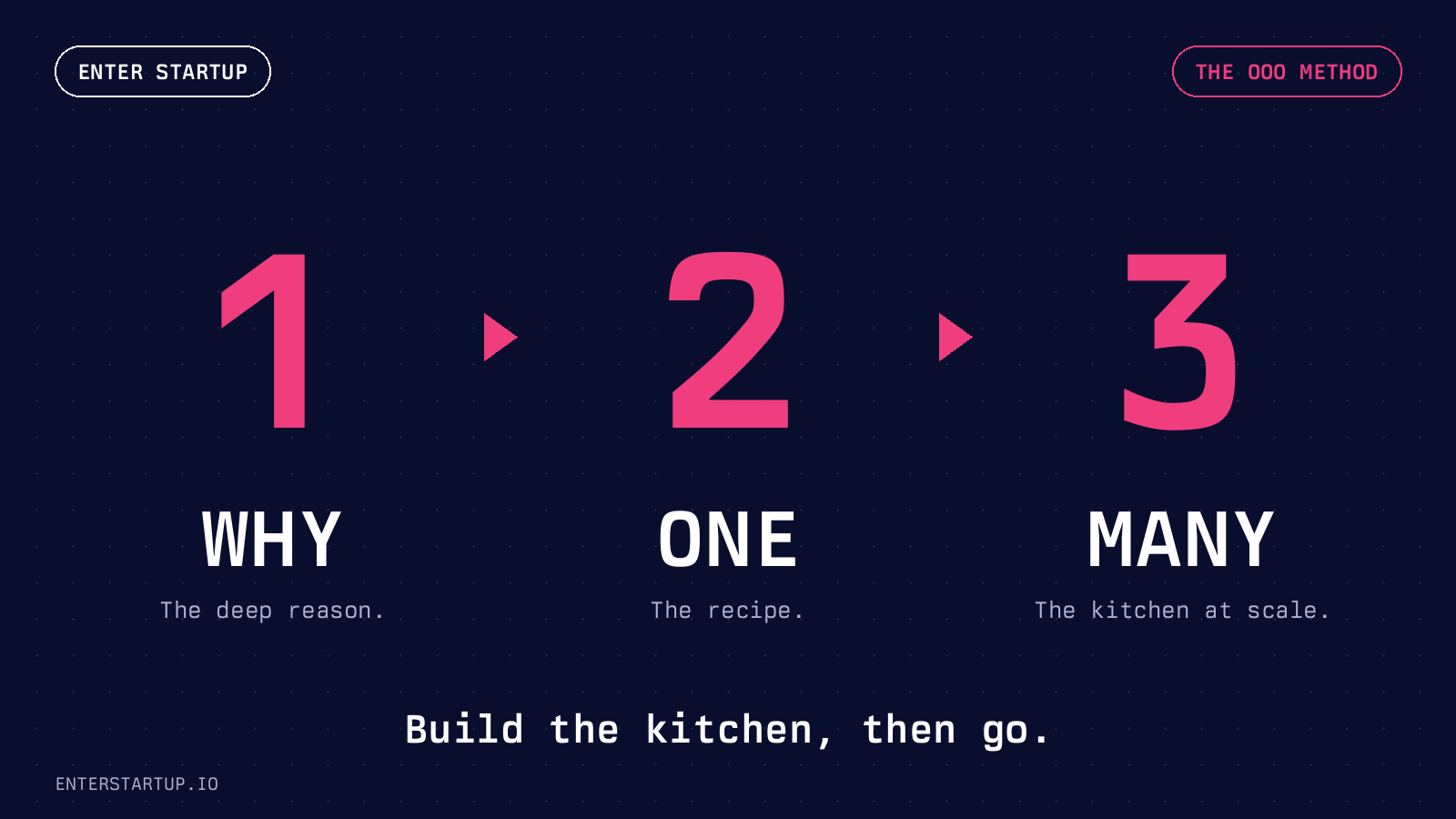
Build the kitchen, then go.
What this looks like in my actual life
I run Enter Startup on weekends. The book, the website, the content, the helping-startup-employees thing. It's a side project that has become a big part of my life. The problem with side projects is that they steal from the rest of your life until you're working all the time and resenting all of it.
I didn't want that. So here's the Why-One-Many run for what I do.
Why. I want to keep helping startup employees. I want to launch the book. I want to grow the brand. I want to run the website. And I want to do all of that without burning out, without losing my weekends to admin work, and without sacrificing time with the people I love. Real life first. Side project second.
One. I sat with Claude (Cowork) over the course of several conversations. Each conversation built up context. Here's the voice I write in. Here's the structure of a blog post. Here's how I research a topic before I write. Here's how I want SEO handled. Here's how I publish to Kajabi. I refined it. I corrected it.
One trick I use constantly. I tell Claude to question itself. To push back on what I just said. To ask me what's missing. Because if it just agrees with me the whole time, I'm building a recipe that just reflects my blind spots. The really good output comes from the back and forth. From letting it tell me where my thinking is thin.
Then I packaged the whole thing as a skill. Now I have a content engine that knows how I work.
Many. That skill runs every time I want to publish something. It produces drafts that already sound like me. It handles the SEO bones. It knows the voice rules I'd otherwise forget. It chains into other skills (research, LinkedIn pairing, thumbnail generation). The hours I used to lose to admin and re-explaining are gone. Which is the whole point. Those hours are now back in my real life. Which is the Why.
If I'd skipped the Why and started with features, I'd have built something cool that didn't matter. If I'd skipped One and tried to scale right away, I'd have a mess of half-built tools. The order is what works. Why first. Then One. Then Many.
The vocabulary, in plain English (it's a kitchen)
A few words you'll keep hearing. Don't panic. Each one is just a thing in the kitchen.
⌖ A skill is a recipe. Written down, named, ready to cook. Lives in a folder on your computer. Inside the folder is a SKILL.md file, which is just a fancy text file in plain English telling Cowork how to handle that kind of work. Anyone can write one. You don't need to code. Cowork picks the right recipe out of the drawer automatically when it sees a job that matches.
⌖ A task is a cooking session. A multi-step job you give Cowork. "Read my Gmail since last Friday, find anything urgent or waiting on a reply, and write me a one-page brief sorted by who's been waiting longest." Cowork pulls out the right recipe, breaks the work down, and gets cooking. You can run a task right now (you in the kitchen) or schedule it to run on its own (the kitchen runs without you, like every Sunday at 9pm). Scheduled tasks are what people call automations. Same recipe, just running without you in the room.
⌖ A connector is your supplier. This is how Cowork plugs into your other apps. Calendar, email, Slack, Notion, Drive, whatever you want. Think of it as the grocery delivery, the butcher, the farmer's market. You authorise each one once. Cowork can then read and write the right things in the right places without you having to fetch ingredients yourself.
⌖ A plugin is a meal kit. A pre-built bundle of recipes (skills) plus the suppliers (connectors) you'd need to cook them, packed together. Anthropic's own words: "Each one bundles skills, connectors, and sub-agents into a single package." Plugins are how someone else's setup becomes yours. You install one, you get all the recipes that came with it. No prep.
⌖ Cowork itself is the kitchen. Lives on your desktop. Has the keys to whichever cupboards (folders) you give it access to. Runs everything in a sandboxed space on your computer. You stay in control of what it can touch.
That's the whole vocabulary. Skill = recipe. Task = cooking. Connector = supplier. Plugin = meal kit. Cowork = the kitchen. If you understand those five words, you understand Cowork. Everything else is just somebody being clever with the same five words.
What stays in your control
I want to flag this up front because honestly, it's the thing that worried me when I started.
Cowork only has access to the folders you grant it. It can't go rummaging around your machine. If it wants to delete something, it has to ask you first. From the official docs: "When using Cowork, Claude requires your explicit permission before permanently deleting any files." You stay the human in the loop on the stuff that matters.
Connectors are the same deal. Cowork can read your Gmail only if you've connected it. Your calendar only if you've authorised it. Each one is a deliberate yes from you.
You're not handing over the keys to your life. You're handing over the keys to the specific cupboards in the kitchen where the work happens. That's a very different thing.
So how do I actually start
Pick your Why. Just one. Don't open Cowork yet. Don't worry about features. Don't watch a tutorial. Don't read another article. Just sit for five minutes and finish this sentence honestly:
In my real life, the thing I want different is _______.
Not a project. Not a deliverable. The level above all that. Mondays back. Weekends free. Inbox quiet. Birthdays remembered. Book launched without burning out. Real life better. That's the Why.
Once you have it, the next step is small. You open Cowork. You start a conversation. You describe what you want. You let it ask questions. You refine. You bundle the whole thing into a skill so you never have to redo it.
That's One.
We'll do Many in Part 2.
A note on Cowork being new
Claude Cowork is in research preview as of April 2026. The exact features will keep evolving. The mental model in this post will outlast the features, but if a screen looks slightly different to what I describe by the time you read this, that's why. Anthropic's official docs at support.claude.com will always have the current version. Read what they wrote, not what some random YouTuber said. (And not me either, if it's been a while since I posted this.)
What's coming in Part 2
Part 2 is where the kitchen actually starts running. We'll cover:
> How I run my mornings without thinking
> Dispatch. Cowork's mobile feature, so I can fire off tasks from my phone while my laptop does the work
> Daisy-chaining. Getting one task to kick off another, so the kitchen does its own prep
> The actual hacks I use day-to-day, including voice-to-text, AI self-criticism, and a few specific skills I built that saved me from drowning in admin
> The honest version of what Cowork still doesn't do well, so you don't get blindsided
If you've read this far and you're nodding, you're already most of the way there.
For now, the homework is one sentence.
In my real life, the thing I want different is _______.
Anyway. That's Part 1. Pick your Why. Talk to the AI. Then come back next week and we'll build the kitchen.
If you want help getting your own Out of Office Method off the ground, I work with startup employees one-on-one through 1:1 coaching. We'll find your Why, then build your first One.
And if you're new here, the free Enter Startup course is the fastest way to get the rest of the picture for how startup work actually operates from the inside.
You just talk to it.